Best Surge Protector for Home Electronics: Don't Let a $30 Part Kill Your $2,000 TV
You paid $1,800 for the OLED TV. The soundbar was $600. The game console was $500. And between all of them and the wall outlet is a power strip you bought at a pharmacy checkout line for $8.97.
That power strip has a red switch and a vague “surge protected” sticker that tells you nothing about how much protection it actually provides. If a real surge hits — a lightning strike within a mile, a transformer fault, a tree taking down a primary line — that sticker will be the only thing left intact.
Here is the reality I have learned maintaining critical power systems: surge protectors are consumable items, not permanent fixtures. They wear out. They sacrifice themselves. And the $20 difference between a junk strip and a real surge protector is the cheapest insurance you will ever buy for your electronics.

What Actually Happens During a Surge
A power surge is a voltage spike — a sudden, brief increase in voltage above the normal 120V (or 230V, depending on your country) that your home wiring carries. These spikes range from a few hundred volts (a refrigerator compressor cycling off) to 6,000 volts or more (a lightning strike nearby).
Your electronics are designed for a narrow voltage window. Most consumer power supplies can tolerate ±10% of their rated input — roughly 108-132V for a 120V nominal system. A surge exceeding this range overloads the capacitors, diodes, and integrated circuits inside the power supply. Sometimes the damage is immediate and obvious (the device won’t turn on). More often it is cumulative — each small surge degrades components slightly until one day the device fails for “no reason.”
A real surge protector works through metal oxide varistors (MOVs) — semiconductor components that change resistance in response to voltage. At 120V, an MOV looks like an open circuit; it does nothing. When the voltage spikes to 300V or more, the MOV’s resistance drops nearly to zero, creating a short path to the ground wire and diverting the excess energy away from your equipment. Each time an MOV diverts a surge, it degrades slightly. Eventually it fails — and that is when the “Protected” LED goes dark.
What to Look For: The Diagnostic Table
When you are standing in an aisle staring at 20 different surge protectors, these are the four numbers that actually matter:
| Spec | What It Means | Minimum | Good | Excellent |
|---|---|---|---|---|
| Joule rating | Total surge energy the unit can absorb before failing | 1,000 J | 2,000-3,000 J | 4,000+ J |
| Clamping voltage | Voltage level at which protection kicks in | 400V | 330V | 330V |
| Response time | How fast the MOVs react to a spike | < 1 nanosecond | < 1 nanosecond | < 1 nanosecond |
| UL 1449 rating | Safety certification for surge protective devices | UL 1449 Listed | UL 1449 Listed (3rd Edition) | UL 1449 Listed (3rd Edition) |
Joule rating is the big one. This number represents total surge energy absorption capacity, not per-event capacity. A 3,000-joule protector does not mean it blocks 3,000-joule surges — it means it can absorb roughly 3,000 joules of cumulative surge energy over its lifetime before the MOVs fail.
Real-world rule of thumb: a lightning strike within 1 mile can induce 100-500 joules into your home wiring. A major utility switching transient: 50-200 joules. An air conditioner or refrigerator compressor cycling: 5-20 joules per event. If your 1,000-joule protector absorbs ten 80-joule events and one 300-joule event from a nearby lightning strike, you have 200 joules left — and no way to know it.
Clamping voltage below 400V is the industry standard for consumer electronics. 330V is common on quality units and is the practical minimum for 120V systems — the MOVs need some margin above the normal peak voltage of 170V (120V RMS × √2). A clamping voltage of 500V or higher is inadequate; by the time it triggers, your equipment has already taken damage.
Response time is not a real differentiator — any MOV-based surge protector responds in under 1 nanosecond. If you see marketing copy emphasizing “picosecond response time,” they are selling the same MOV technology in a fancier box.
The Best Surge Protector for Each Device Type
Different electronics have different plug shapes, power draws, and risk profiles. Here is what to buy for each:
TV and Home Theater
Your TV, soundbar, streaming box, and game console share one wall outlet behind a media console. They need surge protection with coax or Ethernet ports if you use those connections — surges travel through cable lines just as easily as power lines.
What you need: 3,000+ joules, 8-12 outlets with wide spacing for wall-wart adapters, coaxial protection if you use cable TV or an antenna, and a right-angle flat plug to fit behind furniture. The joule rating matters more here than on any other device — a home theater represents the single highest concentration of electronics value in most homes.
Refrigerator and Large Appliances
Modern refrigerators, washing machines, and microwaves all contain control boards. A $400 refrigerator control board fried by a surge is a $400 repair on a $900 appliance — and the repair technician’s diagnostic fee plus labor easily pushes the total toward $600-700.
What you need: 2,000+ joules, rated for 15A continuous load, with a single-outlet or 2-outlet format. Do not chain other devices onto the same protector — appliances generate their own surges when compressors and motors cycle. Use a protector with a 90-degree flat plug so the appliance can sit against the wall.
Desktop PC and Gaming Rig
A desktop PC with a $400 graphics card and $200 motherboard justifies serious surge protection. But if you experience brownouts or blackouts, pair the surge protector with a UPS — the surge protector stops spikes, but the UPS handles voltage dips and gives you time to save work and shut down.
What you need: 3,000-4,000 joules if using a surge protector alone, or rely on the built-in surge protection of a quality UPS (though note: most UPS units offer 300-500 joules of surge suppression — significantly less than a dedicated surge protector). The ideal setup for a gaming PC: plug a UPS into the wall, then plug a high-joule surge protector into the UPS for the PC and peripherals. Yes, most UPS manuals say not to do this — the reality is that quality modern UPS and surge protector combinations do not cause problems, but check your specific models.
Router and Modem
Your networking gear draws 15-30 watts and barely registers on a surge protector’s current rating. But the coax and Ethernet lines are surge pathways that most people overlook.
What you need: 2,000+ joules, coax surge protection for cable modems, Ethernet surge protection if you run long Ethernet cables between floors or to outbuildings. If you also want to keep your internet running during outages, skip the surge protector and get a small UPS for your router and modem instead — it includes surge protection plus battery backup.
What It Costs: Real 2026 Numbers
| Product Tier | Joule Rating | Price Range | What You Get |
|---|---|---|---|
| Bare minimum | 1,000-1,500 J | $12-20 | Basic protection for a single low-value device. Replace after any known surge event. |
| Solid home unit | 2,000-3,000 J | $25-40 | Good for a TV + peripherals or home office equipment. The sweet spot for most people. |
| Premium / theater | 3,500-4,500 J | $45-80 | Coax protection, spaced outlets, connected-equipment warranty. For home theater or gaming setups. |
| Whole-house SPD (Type 2) | kA rated (not joules) | $200-400 (parts) | Installed at the electrical panel. Catches surges before they enter branch circuits. |
The connected-equipment warranty on premium surge protectors sounds appealing — APC and Tripp Lite offer $50,000-$300,000 coverage if their protector fails and your equipment is damaged. Read the fine print: these warranties typically require proof of purchase, proof that the protector was installed correctly, and a claim filed within a specific window. They are better than nothing, but do not count on them as your primary insurance.
A whole-house surge protector installed at the electrical panel costs $200-400 in parts plus electrician labor, and it is the single best surge protection investment you can make. It catches the big surges at the point of entry — before the energy disperses through your branch circuits and finds its way to every outlet in the house.
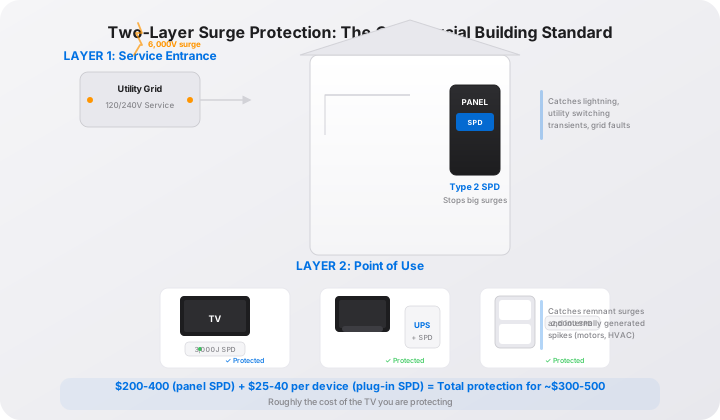
The Two-Layer Defense: What Commercial Buildings Do
Every commercial data center, hospital, and industrial facility uses layered surge protection. It is not because they are paranoid — it is because it works. The layers look like this:
- Type 1 or Type 2 SPD at the service entrance (the main electrical panel). This absorbs the high-energy surges — lightning-induced spikes, utility capacitor bank switching, grid faults.
- Type 3 SPD at the point of use (the plug-in surge protector at the wall outlet). This catches the remnants of large surges and the low-energy surges generated inside the building — copier motors, HVAC cycling, elevator drives.
You do not need a data-center budget to implement this at home. A Type 2 SPD at your panel ($200-400 in parts) plus quality plug-in surge protectors at your expensive electronics ($25-40 each) gives you the same two-layer architecture. The total cost is about $300-500 — roughly the price of the TV you are protecting.
If a whole-house SPD is not in the budget this year, start with quality plug-in protectors at your most valuable electronics and add the panel-level SPD when you can. For details on the installation process, see our whole-house surge protector installation guide.
Five Surge Protector Mistakes I See Repeatedly
The power strip masquerade. People use “power strip” and “surge protector” interchangeably. They are not the same thing. If there is no joule rating printed on the back and no “Protected” LED, it is a power strip — it gives you more outlets and nothing else.
Daisy-chaining. Plugging one power strip into another into another. Each connection adds resistance, heat, and a potential failure point. One quality surge protector with enough outlets costs less than three cheap ones and does not create a fire hazard.
Ignoring the LED. The “Protected” indicator light is your surge protector’s check-engine light. When it goes out, the MOVs are dead. The outlets still work — and that is the trap. People see their TV turn on and assume everything is fine. Replace the unit immediately.
Using a surge protector for a space heater or window AC. Surge protectors are not designed for sustained high-current loads. A 1,500W space heater draws 12.5A continuously — right at the edge of a 15A circuit’s safe operating range. The heat buildup in the protector’s internal wiring degrades the insulation and can cause arcing. Plug high-draw appliances directly into the wall.
Never replacing them. Surge protectors wear out. The MOVs degrade with every surge event — even small ones from refrigerator and AC compressor cycling. After 3-5 years in a typical home, the protection is significantly diminished whether the LED says so or not. Mark the purchase date on the back with a Sharpie and replace on schedule.
Surge Protector vs UPS: Do You Need Both?
This is the most common confusion I address. A surge protector and UPS solve different problems:
- Surge protector: blocks voltage spikes (too much voltage)
- UPS: provides battery backup when voltage drops or disappears (too little or no voltage)
For a gaming PC with unsaved work, you want a UPS. For a TV where you just need spike protection, a surge protector is enough. For a home office PC, the ideal setup is a UPS plugged into the wall, which provides both surge protection (via its built-in MOVs) and battery backup.
The one exception: if you have particularly dirty power — frequent voltage swings, nearby industrial equipment, rural service with long distribution lines — pair a UPS with a panel-level whole-house surge protector. The panel SPD catches the big surges, and the UPS handles voltage regulation and battery backup for your equipment.
The Bottom Line
Here is the simplest decision framework:
- TV, soundbar, game console: Quality plug-in surge protector, 3,000+ joules, $30-50. Replace every 5 years.
- PC with important work: UPS with AVR, 900-1500VA, $120-200. The surge protection is included.
- Refrigerator, freezer, washer: Appliance-rated surge protector, 2,000+ joules, 90-degree flat plug, $25-35. The control board you save is worth 10x the protector cost.
- Router and modem: Small UPS (350-600VA), $50-80. Stay online during outages — the surge protection is a bonus.
- The whole house: Type 2 SPD at the panel, $200-400 in parts. The best single investment in protecting everything plugged into every outlet.
The $9 power strip from the checkout aisle is not a surge protector. It is a false sense of security wrapped in beige plastic. Spend the extra $20 on something with a joule rating, a clamping voltage you can look up, and a “Protected” LED you can glance at whenever you walk past.
When that LED is dark, your electronics are naked. And you will not know it until the next storm.
Recommendations based on field experience maintaining power quality in critical infrastructure environments. Prices current as of August 2026. [Amazon affiliate link - pending tracking ID]
Frequently Asked Questions
How many joules should a surge protector have for home electronics?
For general home electronics (TV, game console, router), aim for 2,000-3,000 joules minimum. For a home theater system or gaming PC with expensive components, 3,000-4,000 joules. The joule rating tells you how much surge energy the unit can absorb before its protection circuitry fails. Every surge event consumes part of that rating — a 1,000-joule protector hit by a 600-joule spike is now a 400-joule protector. Higher joule ratings give you more headroom over the protector's 3-5 year lifespan.
What's the difference between a surge protector and a power strip?
A power strip just gives you more outlets — zero surge protection. A real surge protector contains metal oxide varistors (MOVs) that divert excess voltage to the ground wire when a spike hits, clamping the output to a safe level. The easiest tell: if it doesn't have a 'Protected' indicator light and a joule rating printed on the back, it's a power strip, not a surge protector. Power strips are especially dangerous when people daisy-chain them and overload a single outlet.
Do I need a surge protector for my refrigerator?
Yes — refrigerators contain sensitive control boards that cost $200-400 to replace. A voltage spike does not need to kill the compressor to total the fridge; it just needs to fry the control board. Use a surge protector rated for appliance loads: 2,000+ joules, 15A capacity, with a 90-degree flat plug so the fridge can sit flush against the wall. Do not plug a refrigerator into a UPS — the compressor startup surge will trip or damage most consumer UPS units.
How do I know when my surge protector needs to be replaced?
Look at the 'Protected' LED. If it is off, the surge protection is dead — even though the outlets still deliver power. This is the most common failure: people assume the strip is working because the TV turns on, not realizing the protection circuitry burned out silently two years ago. Replace surge protectors every 3-5 years regardless of the LED, and immediately after a known major surge event (nearby lightning strike, transformer explosion, tree taking down a power line).
Is one surge protector enough, or do I need whole-house protection?
One plug-in surge protector is better than nothing, but layered protection is the standard in every commercial building for good reason. A Type 2 whole-house surge protector at the electrical panel ($200-400 in parts) stops the big surges — lightning-induced spikes, utility switching transients — before they enter your home wiring. Plug-in protectors at the outlet catch smaller surges and the remnants of large ones. Together they create a two-layer defense. For the cost of replacing one fried TV, you can install both layers.