Best UPS for Router and Modem: Keep Your Internet Alive During Every Blackout
You are on a video call. The lights flicker once, then everything goes dark — except your laptop screen, running on its own battery. But the call freezes. The Wi-Fi symbol disappears. Your router and modem are dead, and so is your meeting.
The fix costs about $50 and takes five minutes to set up. I have been recommending it to friends for years, and almost nobody does it until the first outage proves me right.
Here is the secret that most home backup guides miss: keeping your internet alive during a blackout requires almost no power. A router and modem together draw 15-30 watts — a fraction of what a desktop PC pulls. That means a small, inexpensive UPS can run them for hours, not minutes.
Why a Dedicated Router UPS Makes Sense
Most people connect their router to the same UPS as their desktop PC. That works, but it has a built-in failure mode: when the PC drains the battery in 10-15 minutes, the internet goes down too. A separate small UPS for networking gear solves this.
| Approach | Runtime | Cost | Best for |
|---|---|---|---|
| Router on main PC UPS | 10-15 min (shared with PC) | $0 extra | Short outages, saving work |
| Dedicated small UPS for router | 1-4 hours | $50-80 | Video calls, cloud work, staying online |
| Router + modem each on battery | 1-4 hours | $50-80 | Full home network uptime |
The math is straightforward. A 600VA/330W UPS running a 20W load of router + modem + maybe a small switch is at roughly 6% capacity. The runtime curve is not linear — at very low loads, efficiency drops slightly, but you still get vastly more runtime than at 80% load. Most manufacturers’ runtime charts show 1.5-3 hours for a 600VA unit at 20-30W.
Quick Picks
| Scenario | Pick | Key Spec | Why |
|---|---|---|---|
| Best overall value | APC BE600M1 | 600VA/330W, 7 outlets | Compact, quiet, under $80 — the gold standard for networking UPS |
| Budget pick | CyberPower ST425 | 425VA/260W, 4 battery outlets | Minimal footprint, enough for router + modem + one extra device |
| Ultra-compact (DC output) | TalentCell mini UPS | 12V DC output, 6,000mAh | No AC adapter needed — plugs directly into 12V routers, 4-6 hours runtime |
What to Look For (and What to Ignore)
When you are buying a UPS exclusively for networking gear, the checklist is shorter than for a desktop UPS — and some features you would pay a premium for elsewhere are irrelevant here.
Things that matter:
- Outlet count and spacing. Your router and modem both have wall-wart power adapters — those chunky bricks that block adjacent outlets. Look for widely spaced outlets or a compact unit where you can use every port without adapters fighting for space. The BE600M1 has two outlets spaced specifically for transformer blocks.
- Noise level. This UPS will likely live in your living room, hallway, or home office — not a basement. Some budget units have audible coil whine when on battery. The APC and CyberPower units recommended here are essentially silent in normal operation.
- Audible alarm behavior. A beeping UPS in the middle of the night is annoying. Check whether the alarm can be silenced, and whether the unit beeps continuously or only periodically on battery. Most APC units let you mute the alarm with a button press. (For more on UPS beep patterns, see our troubleshooting guide.)
Things that do not matter for a router UPS:
- Pure sine wave output. Router and modem power adapters are switch-mode supplies that convert AC to low-voltage DC. They do not care about waveform shape. Simulated sine wave is perfectly fine and saves you $30-60.
- High VA/watt rating. You need maybe 30 watts. A 1500VA unit rated for 900W is like buying a freight truck to carry a grocery bag. The oversized inverter in a large UPS actually runs less efficiently at very low loads. Match the UPS to the load.
- LCD display with runtime estimate. Nice to have, but you can estimate runtime yourself. A small LED indicator showing “on battery” is sufficient.
- USB shutdown capability. Your router does not run PowerChute. Unless you are protecting a Raspberry Pi or small server alongside the networking gear, skip the data port.
Setup: Five Minutes, One Rule
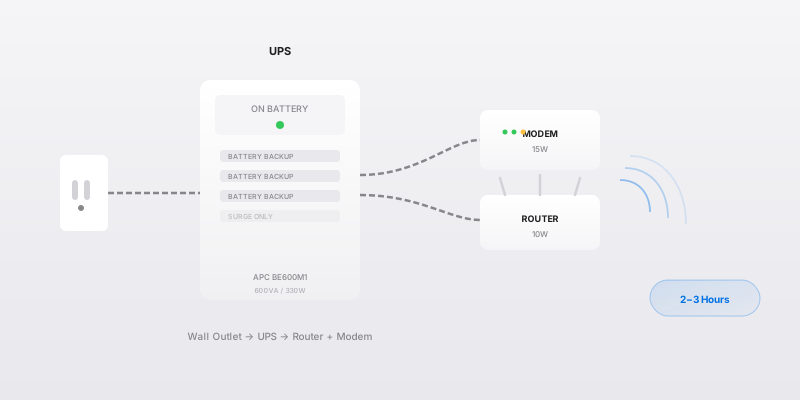
- Place the UPS near your modem and router — ideally on a shelf or desk, not on carpet (heat buildup).
- Plug the UPS into the wall outlet. Let it charge for at least 8 hours before relying on it — factory batteries ship partially charged.
- Plug the modem and router power adapters into the battery-backed outlets on the UPS (not the surge-only side).
- If you have a network switch or VoIP phone adapter, plug that in too if there is room.
- Test it: unplug the UPS from the wall. If your Wi-Fi stays up and your devices stay connected, you are done. Plug it back in.
The one rule: do not plug a power strip into the UPS to get more outlets, and do not plug the UPS into a surge protector. The filtering circuitry in surge protectors can interfere with the UPS’s transfer switch timing. Plug the UPS directly into the wall. If you need more outlets downstream, use a basic power strip without surge suppression on the UPS output — or just pick a UPS with enough outlets from the start.
Runtime Reality Check: What to Expect
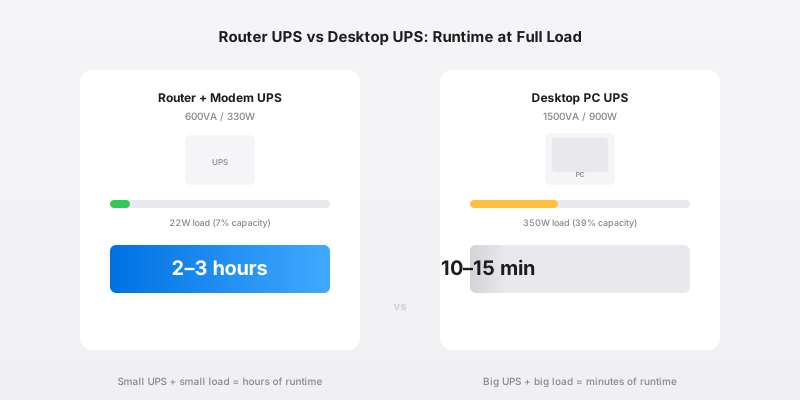
Here is what real-world runtime looks like for a 600VA UPS powering networking gear only:
| Load | Equipment | Approximate Runtime |
|---|---|---|
| 15W | Router only | 3-4 hours |
| 25W | Router + modem | 2-3 hours |
| 35W | Router + modem + 8-port switch | 1.5-2 hours |
| 50W | Router + modem + switch + small NAS | 1-1.5 hours |
These numbers assume a healthy battery. If your UPS battery is over 3 years old, cut the estimates by 30-50%. Heat also matters — a UPS in a 30°C closet might deliver 20% less runtime than the same unit on a cool shelf.
Real example from my own setup: I have a BE600M1 running a fiber ONT (optical network terminal), a Wi-Fi 6 router, and a 5-port switch. Combined draw measured at the wall: 22 watts. During a planned outage last winter for grid maintenance, it kept my home network alive for just over 2.5 hours before the low-battery warning kicked in. That covered the entire 90-minute outage with room to spare.
The ISP Question: Will Your Internet Actually Stay Up?
This is the most common objection I hear: “If the power is out, won’t the ISP’s equipment be down too?”
The answer: probably not, at least not immediately. Here is how each major ISP type handles outages:
| ISP Type | Backup at Street Level | Typical Uptime During Outage |
|---|---|---|
| Fiber (FTTH) | Battery backup at OLT/node, 4-8 hours | Yes — the fiber itself is passive glass, no power needed between you and the node |
| Cable (coax) | Battery backup at node amplifiers, 2-6 hours | Usually yes for the first few hours |
| DSL (copper) | Central office battery banks, 24+ hours | Most resilient — copper lines carry power from the CO |
| Fixed wireless / 5G home | Tower battery backup, varies widely | Unpredictable — depends on the carrier’s backup configuration |
In practice, the weakest link in the chain is almost always your own ONT/modem/router inside the house. Once those have power, your odds of staying connected through a typical outage are good. The longer the outage, the more ISP infrastructure fails — but for the 30-minute to 3-hour windows that cover 90% of residential outages in the US, a router UPS keeps you online.
What About a Power Bank Instead?
Some routers can run directly off USB-C power banks. If your router takes 12V DC input and draws under 15W, a 20,000mAh USB-C PD power bank with a 12V trigger cable is a viable alternative — silent, portable, and doubles as a phone charger the rest of the time.
The trade-off: most power banks don’t support pass-through charging (you can’t charge them while they power a device), and USB-C trigger cables add a failure point. For set-and-forget reliability, a dedicated UPS is the right call. If you want portability and already own a large power bank, it is worth testing.
For extended outages beyond 4-6 hours, you are moving into portable power station territory, which is a different category entirely.
The Bottom Line
A $50-80 UPS for your router and modem is the cheapest, simplest home backup upgrade that almost nobody makes. It requires no electrician, no installation, and no maintenance beyond a battery swap every 3-5 years. The first time a blackout hits during a work call or a movie and everything stays connected, you will wonder why you did not do it sooner.
Buy this if: you work from home, take video calls, game online, or just want to scroll Twitter while the neighbors sit in the dark.
Skip this if: your internet goes down reliably during outages because the ISP node loses power too (test it once: check if your phone’s cellular data still works — if it does, the ISP infrastructure is probably fine).
Recommendations based on field experience managing UPS fleets in critical infrastructure. Prices and availability current as of August 2026. [Amazon affiliate link - pending tracking ID]
Frequently Asked Questions
How long will a UPS run just a router and modem?
A router and modem together draw 15-30 watts. Even a small 350-600VA UPS rated for 180-330 watts will run them for 1-4 hours — far longer than it would run a desktop PC. The exact time depends on the UPS battery capacity and your specific equipment's draw. A 600VA unit with a healthy battery running a 20W load typically delivers 2-3 hours of runtime.
Do I need a pure sine wave UPS for a router and modem?
No. Routers and modems use low-voltage DC adapters (usually 12V, 1-3A) that convert AC to DC — they don't care about sine wave shape. A basic simulated sine wave UPS is perfectly fine and costs 30-50% less than an equivalent pure sine wave unit. Save the pure sine wave budget for equipment with active PFC power supplies like desktop PCs and NAS devices.
Can I plug my router into any UPS, or do I need a special one?
Any UPS with enough capacity will work. However, wall-wart power adapters for routers and modems are bulky — look for a UPS with spaced outlets or a compact form factor that sits neatly on a desk or shelf. Some mini UPS units designed specifically for networking gear have DC output jacks that bypass the AC-DC conversion entirely, which is more efficient but ties you to a specific voltage.
Should I put the router UPS on the same circuit as my main UPS?
You can, but I recommend a separate small UPS for networking gear. Here's why: if your main UPS runs down powering a desktop PC, your internet stays up independently. This matters for saving cloud work, finishing a video call, or getting outage alerts from your ISP's app. Two small UPS units give you more flexibility than one big one.
What happens to my internet during a power outage — doesn't the ISP go down too?
It depends on your ISP's infrastructure. Cable and fiber ISPs typically have battery backup at their street-level nodes that lasts 4-8 hours. DSL runs on copper lines with central-office battery banks that last much longer. The weakest link is usually your own equipment — the modem and router in your house. A UPS solves that. If your ISP node also loses power, you're out of luck, but in most urban and suburban outages the ISP stays up while your house goes dark.