Best UPS for TV and Home Theater: Do You Actually Need One? (2026)
Here is a question I get a lot, phrased a dozen different ways: “Should I put a UPS on my TV?” Usually from someone who just spent $2,000 on an OLED and read somewhere that power problems kill screens.
The honest answer is more boring than most people expect: for a TV by itself, a UPS is almost always unnecessary. A television has no unsaved work to lose. A hard power cut does not damage the panel. The TV does not care whether it was shut down gracefully — it is a screen, not a computer.
But the moment you add a game console, a DVR, a projector, or a smart TV that updates itself at 3 a.m., the answer flips. Then a UPS protects something real. Here is how to tell which camp you are in.
First, the Short Version
| Your setup | What you actually need | Why |
|---|---|---|
| TV + streaming stick only | Surge protector (2,000+ joules) | No data to lose, no state to corrupt. Surge is the real risk. |
| TV + game console (PS5/Xbox) | Pure sine wave UPS (900VA+) | Protect mid-game saves and console storage from hard cuts. |
| TV + DVR / cable box | Small UPS (600VA) | Prevent corrupted recordings and interrupted scheduled shows. |
| Projector setup | UPS (pure sine wave) | Keep the cooling fan running after power loss — lamp life depends on it. |
| Smart TV with auto-updates | Small UPS (600VA) | Eliminates the rare “bricked mid-update” failure. |
If you are only in the first row, you can stop reading here and go buy a good surge protector. If any of the other rows describe your living room, read on.
What a UPS Does and Does Not Do for a TV
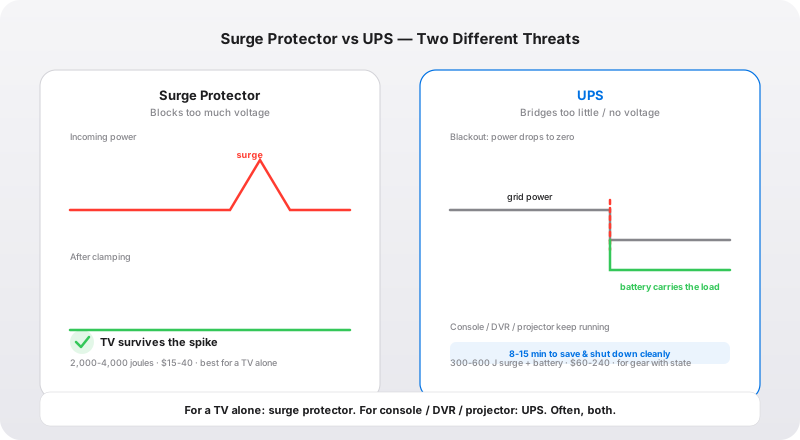
A lot of people buy a UPS for their TV thinking it is a fancier surge protector. It is not. The two devices solve opposite problems:
- A surge protector defends against too much voltage — the lightning strike, the grid switching spike, the surge when the refrigerator compressor kicks off. This is the threat that actually kills TVs.
- A UPS defends against too little or no voltage — the blackout, the brownout, the flicker. It keeps equipment running for a few minutes on battery so it can be shut down cleanly.
Every UPS includes some surge protection, but usually far less than a dedicated surge protector (300-600 joules vs. 2,000-4,000). So the real question is not “UPS or surge protector?” — it is “which of my devices have state worth protecting, and how do I cover the surge risk at the same time?”
For the surge half of the equation, I covered the layered-defense approach in detail in the whole-house surge protector cost guide — the short version is that a whole-house SPD at the panel plus a quality point-of-use surge protector is the setup that actually survives a real lightning season.
The Equipment That Actually Needs a UPS
This is the part most “best UPS for TV” roundups gloss over. Let me go through the devices where a UPS genuinely pays for itself.
Game consoles: the strongest case
A PS5 or Xbox Series X under load draws 150-250W and is effectively a small PC. It writes to internal storage constantly — save data, game state, sometimes a patch mid-download. Cut power mid-write and you risk a corrupted save or, in the worst case, a storage repair cycle that costs you time and progress. If you have ever lost 80 hours of an RPG to a power blip, you know exactly what a UPS is worth.
Consoles also have active PFC power supplies, which means a simulated sine wave UPS can make them buzz, overheat, or reboot. If you are protecting a console, buy pure sine wave. This is the one non-negotiable spec for this use case.
DVRs and cable boxes: the quiet risk
A DVR records to a hard drive on a schedule. A power cut mid-recording corrupts that recording; a cut during a scheduled recording means the show simply never records. A DVR is also constantly writing its live buffer to disk. A small UPS (600VA/330W) keeps a DVR and modem alive for 30-60 minutes — enough to ride through almost any outage — and costs under $80.
Projectors: the one people forget
This is the least obvious and most defensible use case. A projector lamp runs extremely hot, and after you power down, the cooling fan keeps running for a minute or two to bring the lamp down safely. Cut power the instant you hit “off” and the lamp bakes in its own heat — this measurably shortens lamp life, and on a projector where a replacement lamp runs $150-400, that is money on the table. A UPS lets the projector complete its cool-down cycle every single time, outage or not.
Smart TVs: the edge case
A smart TV that is mid-firmware-update when power drops can be left stuck on a boot loop, requiring a factory reset or a service call. This is rare — manufacturers design update processes to be at least somewhat resilient — but I have seen enough “TV bricked itself overnight” calls to know it is not a myth. If your TV auto-updates and you live somewhere with flaky power, a small UPS removes this failure mode for good.
Sizing: How Much Power Does a Home Theater Actually Draw?
Here are the real-world numbers I use when someone asks me to size a UPS for their living room:
| Device | Typical power draw |
|---|---|
| 55-65" LED TV | 60-150W |
| OLED TV (same size) | 90-200W (varies with brightness) |
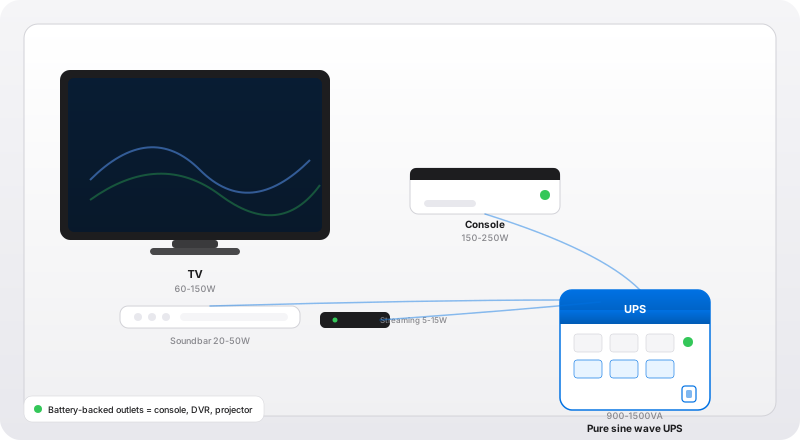
| Game console (PS5 / Xbox Series X) | 150-250W under load |
| Streaming box (Apple TV / Roku) | 5-15W |
| Soundbar | 20-50W |
| DVR / cable box | 20-40W |
| AV receiver | 50-150W idle, more at volume |
| Projector | 200-350W |
Two things stand out. First, a TV on its own is a light load — a 600VA unit runs it for an hour or more, which is why the “TV alone doesn’t need a UPS” advice holds. Second, add a console and the load doubles. A TV + console + streaming box + soundbar is realistically 300-450W, which pushes you into the 900VA/500W to 1500VA/1000W range if you want meaningful runtime.
For the math on how VA and watts relate — and why a 1000VA UPS is not the same as 1000W — the UPS runtime and lifespan guide walks through it with a table you can check your own gear against.
What to Look For (and What to Skip)
When you are buying a UPS specifically for a home theater, the checklist is shorter than for a home office, and a couple of features you would pay for elsewhere are irrelevant here.
Things that matter:
- Pure sine wave output — required if a console, AV receiver, or anything with an active PFC power supply is on the unit. For TV-only or DVR-only, skip it and save the money.
- Enough outlets for the transformer bricks — a console power brick and a soundbar wall-wart are chunky. Look for widely spaced outlets so you can use every port.
- A way to silence the alarm — a beeping UPS in the living room during a movie is unacceptable. Confirm the unit has a mute button before you buy.
- Joule rating on the surge side — since the UPS is doing double duty, note its joule rating. It will not match a dedicated surge protector, so keep a proper surge protector on the TV even if the TV shares the UPS.
Things that do not matter for a home theater:
- High VA/watt headroom beyond your load — a 1500VA unit running a 60W TV is wasteful. Match the UPS to the actual load.
- USB shutdown / network management — a TV does not run PowerChute. Unless you are protecting a media server, skip the data port.
- LCD runtime displays — nice to have, but for a living-room UPS you just need an “on battery” indicator, not a runtime countdown.
The Setup, Step by Step
- Plug the UPS into the wall directly — not into a power strip, and never daisy-chained into another surge protector (the filtering can interfere with the UPS transfer switch).
- Let it charge 8 hours before you rely on it — factory batteries ship partially charged.
- Put the console, DVR, projector, or smart TV on the battery-backed outlets. The TV alone can go on the surge-only side if you prefer.
- Keep a dedicated surge protector for the TV if the TV is not on the battery outlets — the UPS surge rating alone is thin insurance for a $2,000 panel.
- Test it once: unplug the UPS from the wall and confirm your console stays on and your projector’s fan keeps spinning. If something reboots, your unit is undersized or on the wrong waveform.
The Bottom Line
A TV by itself does not need a UPS — it needs a good surge protector, and it needs one regardless. What needs the UPS is the state sitting next to the TV: the console save, the DVR recording, the projector’s cooling cycle, the smart TV’s firmware update.
If your living room is a TV and a streaming stick, spend your money on a high-joule surge protector and be done. If you have a console, a DVR, or a projector, a pure sine wave UPS is cheap insurance against the exact moment the power company decides to ruin your evening. And if you are not sure whether the beeping you already hear is a real warning, start with this troubleshooting guide.
Frequently Asked Questions
Do I need a UPS for my TV?
For a TV alone — no. A TV has no unsaved files, and a hard power cut will not damage the screen. What a UPS protects is the equipment around the TV that does have state: a game console mid-game, a DVR mid-recording, a smart TV mid-firmware-update, or a projector that needs its cooling fan to keep running after shutdown. If your setup is just a TV and a streaming stick, a high-joule surge protector is the better spend. If you have a console, DVR, or projector, a UPS is worth it.
Will a power outage damage my smart TV?
Usually not from the outage itself — but the timing matters. A smart TV doing an operating-system or firmware update when power drops can be left 'bricked' (stuck on a boot loop) and require a factory reset or a service call. This is rare but real, and it is the one scenario where a UPS genuinely protects a TV's own hardware. If your TV does frequent automatic updates, a small UPS on the TV removes this failure mode entirely.
What size UPS do I need for a TV and game console?
A modern 55-65" LED TV draws 60-150W, a game console 150-250W under load, and a streaming box 5-15W. A TV + one console + streaming box + soundbar is typically 300-450W. A 1500VA/900W UPS covers this comfortably and gives 8-15 minutes of runtime — enough to save a game and shut down cleanly. If you only back up the TV and streaming box (no console), a 600VA/330W unit is plenty.
Pure sine wave or simulated sine wave UPS for a TV?
For a TV, soundbar, and streaming box, simulated (stepped) sine wave is fine — their power supplies are forgiving. The exception is a modern game console or AV receiver with an active PFC power supply, which can buzz, overheat, or reboot on a simulated wave. If you are protecting a PS5, Xbox, or a high-end AV receiver, spend the extra for a pure sine wave UPS. For a TV-only setup, save the money and use simulated.
Surge protector or UPS for a home theater?
Think of it as two different threats. A surge protector defends against too much voltage (lightning, grid spikes) — and for a TV, this is the bigger risk, so a quality surge protector with 2,000+ joules is non-negotiable either way. A UPS defends against too little or no voltage (blackouts, brownouts) and only matters if you have equipment that suffers from sudden power loss. Most home theaters need both: a surge protector for the TV, and a UPS for the console, DVR, or projector.