Home Battery Backup Without Solar: Keep Your Lights On When the Grid Goes Down
Most people think home batteries only make sense with solar panels. They see the price of a Tesla Powerwall, do the math on solar payback periods, and conclude that batteries are a rich person’s toy — something for Californians with net metering and too much rooftop real estate.
They are wrong. Or at least, they are only half right.
A standalone battery backup system — no solar, no net metering, no tax credit gymnastics — is quietly becoming the most practical outage solution for ordinary homeowners. It does not roar like a generator. It does not need gasoline that goes stale in the tank. It does not care whether you are home to start it. And unlike a generator that sits unused 99.7% of the year, a grid-connected battery can pay you back every single day if your utility has time-of-use rates.
Here is everything you need to know before spending a dollar on one.
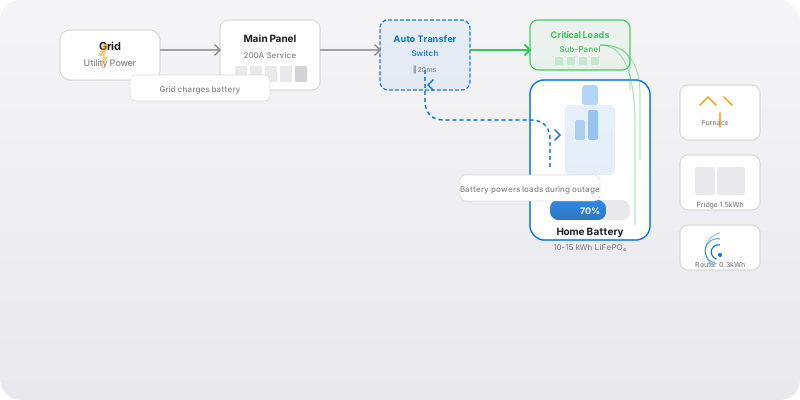
The Three Ways to Back Up Your Home Without Solar
There are three distinct approaches to battery backup. They serve different budgets, different houses, and different tolerance levels for inconvenience.
Tier 1: Portable Power Station + Transfer Switch ($2,000-8,000)
This is the entry point that most people should start with. A large portable power station — EcoFlow Delta Pro Ultra, Anker Solix F3800, Jackery 5000 — paired with a manufacturer-specific transfer switch or critical loads panel gives you whole-home backup capability in a package you could technically load into a truck.
The power station lives in your garage or basement, plugged into a 30A or 50A inlet connected to a manual or automatic transfer switch. When the power goes out, the transfer switch isolates your essential circuits and the battery takes over. Transfer time on the better units (EcoFlow, Anker) is under 20 milliseconds — fast enough that your router does not reboot and your desktop computer does not notice.
Pros: Lower upfront cost, portable (take it camping or to a job site), no permanent installation required for basic use, modular (buy one unit now, add a second later).
Cons: Lower total capacity (3.6-7.2 kWh per unit), manual intervention sometimes required, less elegant than a wall-mounted system, and the transfer switch installation still requires an electrician.
Real cost, installed: A Delta Pro Ultra with one extra battery (14.4 kWh total) plus the Smart Home Panel 2 and professional installation runs about $7,000-9,000. This powers a critical loads panel — fridge, lights, gas furnace, router, sump pump — for 24-36 hours.
Tier 2: Dedicated Home Battery ($8,000-15,000)
This is the category where the Tesla Powerwall 3, Enphase IQ 5P, and FranklinWH aPower 2 live. These are wall-mounted, permanently installed, and designed to integrate with your electrical panel through an automatic transfer switch or backup gateway.
The Enphase IQ 5P is the standout in 2026: 5 kWh per unit, modular (start with one, add up to 80), 3.84 kW continuous output per unit, and a 15-year warranty. Two IQ 5Ps give you 10 kWh and 7.68 kW output — enough to run a gas furnace, refrigerator, lights, router, and a window air conditioner simultaneously.
The FranklinWH aPower 2 holds 15 kWh per unit with 10 kW continuous output — a single unit rivals two Enphase batteries and handles well pumps and central air conditioning startup surges that trip smaller inverters.
Pros: Clean installation, automatic operation, high power output, 10-15 year warranties, whole-home integration.
Cons: Higher cost, permanent installation, limited to the manufacturer’s ecosystem, difficult to expand across brands.
Real cost, installed: A single Enphase IQ 5P system with the System Controller 3 for backup capability: $5,000-7,000 installed. Two IQ 5Ps plus the controller: $9,000-12,000 installed. A FranklinWH aPower 2: $10,000-14,000 installed.
Tier 3: DIY LiFePO4 Rack ($3,000-8,000)
This is the route for people who are comfortable with electrical work — and I mean genuinely comfortable, not “watched a YouTube video once” comfortable. You buy a server-rack LiFePO4 battery (EG4, SOK, Ruixu), an inverter-charger (Victron MultiPlus-II, EG4 6000XP), and a sub-panel for critical loads.
A 48V 100Ah EG4 battery holds 5.12 kWh and costs around $1,200-1,500. Stack four in a rack and you have 20 kWh for under $6,000 in batteries. Add a $1,500 inverter-charger and a few hundred dollars in wiring, breakers, and a sub-panel, and you have a 20 kWh whole-home backup system for under $8,000 — less than half the cost of an equivalent pre-packaged system.
Pros: Far lower cost per kWh, repairable (standard components, no proprietary lock-in), expandable in any increment, higher cycle life (server rack batteries are designed for daily deep cycling).
Cons: You are the warranty department. No app ecosystem, no customer support hotline, no pretty enclosure. Your homeowner’s insurance may have opinions about non-UL-listed equipment. Installation requires genuine electrical knowledge — this is not a weekend project for a beginner.
Important: If you go this route, the inverter-charger is the component you do not cheap out on. A Victron MultiPlus-II or EG4 6000XP has proper UL listing, clean sine wave output, and reliable transfer switching. A no-name inverter from an online marketplace will fail, and when it does, it may take your refrigerator’s compressor with it.
What Can You Actually Power, and for How Long?
This is the question that separates realistic planning from wishful thinking. Here is the math.
The critical loads panel approach: Instead of trying to power your entire 200A service, you install a sub-panel — typically 6 to 12 circuits — that the battery feeds during an outage. These circuits cover:
| Circuit | Typical Daily Consumption | Notes |
|---|---|---|
| Refrigerator | 1.0-1.5 kWh | Modern Energy Star; older units 2-3 kWh |
| Chest freezer | 0.8-1.2 kWh | Well-insulated units sip power |
| Gas furnace blower | 2-4 kWh | During heating season; negligible in summer |
| LED lights (whole house) | 0.3-0.5 kWh | Assuming you do not leave every light on |
| Internet router + modem | 0.2-0.3 kWh | Tiny draw, huge quality-of-life impact |
| Laptop/phone charging | 0.2-0.3 kWh | Several devices |
| Sump pump | 0.5-2.0 kWh | Highly variable; heavy rain days are higher |
| Daily total | 5-10 kWh | Typical suburban home critical loads |
What capacity gives you:
- 5 kWh (one Enphase IQ 5P): About 12-18 hours for a modest critical load. Enough for the typical 4-8 hour suburban outage with margin.
- 10 kWh (two IQ 5Ps, or one EG4 rack of two): 24-36 hours. Covers an overnight outage with confidence and most day-long events.
- 13.5 kWh (one Tesla Powerwall 3): 24-48 hours depending on load. The sweet spot for single-family homes in areas with reliable-but-not-perfect grid power.
- 20+ kWh (multiple units or a full server rack): 48+ hours. Multi-day outage coverage. At this point you should seriously consider adding a small generator for the tail end of extended events.
The loads you do NOT put on battery backup: Electric resistance heat (baseboards, space heaters), central air conditioning (unless you have a very large system), electric water heaters, electric clothes dryers, EV chargers, hot tubs, and pool pumps. Any purely resistive heating load will drain a battery in under an hour. If you have electric heat and live in a cold climate, your battery backup plan must include an alternative heat source — a wood stove, a propane heater, or a generator for the heating season.
The Time-of-Use Arbitrage Angle
Here is something most backup power articles skip: a grid-connected battery can pay for itself even if you never experience a single outage.
If your utility has time-of-use (TOU) rates — cheap electricity at night, expensive in the late afternoon and evening — a battery lets you buy low and use high. You charge the battery during off-peak hours (midnight to 6 AM, typically $0.05-0.08/kWh) and discharge it during peak hours (4 PM to 9 PM, typically $0.25-0.50/kWh).
The daily spread on 10 kWh: charge cost $0.50-0.80, discharge value $2.50-5.00. Daily profit: $2.00-4.20. Annual: $730-1,533.
At $730/year, a $7,000 system pays for itself in 9.6 years — not counting outage protection, which is the real reason you bought it. At $1,533/year (California or Northeast rates), payback drops to 4.6 years. Add in the avoided cost of one flooded basement or one refrigerator full of spoiled food, and the math tilts further.
This is not the primary reason to buy a battery — outage protection is — but it transforms the battery from a pure insurance expense into a partially self-funding asset. Several systems (Tesla, Enphase, FranklinWH) include automated TOU modes that handle the charge/discharge schedule without user intervention.
Installation: What the Electrician Actually Does
For a dedicated home battery system, here is what happens on installation day:
Site assessment (done beforehand): Where the battery goes — garage wall, basement, exterior wall (weather-rated enclosures). Must be within ~50 feet of the main panel. Must have clearance for cooling airflow. Cannot be in a bedroom, closet, or egress path per NEC.
Critical loads sub-panel (2-4 hours): A new sub-panel is mounted next to the main panel. The circuits you want backed up are moved from the main panel breakers to the sub-panel. This is the most labor-intensive part.
Automatic transfer switch or backup gateway (1-2 hours): Mounted between the main panel and the sub-panel. This device detects grid failure and isolates your home from the grid within milliseconds — both to protect your equipment and to prevent backfeeding that could electrocute a line worker.
Battery mounting and wiring (2-3 hours): The battery unit(s) are hung on the wall, connected to the transfer switch, and wired to a dedicated breaker. Communications wiring is run if the system has a monitoring gateway.
Commissioning and testing (1 hour): The system is powered up, configured, and tested. The electrician simulates a grid outage to verify transfer time and load handling.
Total labor: 6-10 hours. Total installation cost: $2,000-5,000 depending on complexity and local rates. Permits add $200-500 and typically take 1-3 weeks for approval.
The one thing that will blow your budget: If your main panel is full and needs a service upgrade to accommodate the transfer switch, add $3,000-6,000 for a new 200A panel. This is more common in older homes (pre-1990) where the original panel was sized for a much smaller electrical load.
The Systems Worth Your Money in 2026
| System | Capacity | Continuous Output | Installed Cost | Best For |
|---|---|---|---|---|
| EcoFlow Delta Pro Ultra + SHP2 | 6-14.4 kWh (expandable) | 7.2 kW | $5,000-9,000 | Entry-level, renters, portability |
| Enphase IQ 5P (2 units) | 10 kWh | 7.68 kW | $9,000-12,000 | Suburban homes, modular expansion |
| FranklinWH aPower 2 | 15 kWh | 10 kW | $10,000-14,000 | Well pumps, AC startup, high power needs |
| Tesla Powerwall 3 | 13.5 kWh | 11.5 kW | $10,000-14,000 | High power output, integrated ecosystem |
| DIY EG4 rack (4 × 5.12 kWh) | 20.5 kWh | 6-8 kW | $6,000-9,000 | Cost-optimized, DIY-capable |
Bottom Line
A home battery backup system without solar is not a compromise — it is a deliberate choice that makes sense for millions of homes. If your outages are measured in hours, not days, and you value silent, automatic, maintenance-free operation, a battery beats a generator in almost every way except runtime.
Start by listing the circuits you cannot live without for 24 hours. Do the math on their consumption. Size the battery accordingly. And if your utility has time-of-use rates, let that battery earn its keep every day — not just during the 0.3% of the year when the grid is down.
The generator transfer switch guide covers the other side of the equation if you are still weighing battery vs generator. And if you are in a flood-prone area, a sump pump battery backup is a smaller, more focused version of the same concept — protecting a single critical device instead of a whole panel. +++
Frequently Asked Questions
Can I install a home battery backup system without solar panels?
Yes. This is called AC-coupled or standalone battery storage. The battery charges from the grid when power is available, then discharges to your home during an outage via a transfer switch or critical loads panel. You do not need a single solar panel to make it work. The battery sits between your main panel and a sub-panel that feeds essential circuits — refrigerator, lights, furnace, router, sump pump. When the grid drops, the battery takes over in milliseconds. When grid power returns, the battery recharges automatically.
How much does a home battery backup system cost in 2026?
Three tiers: Entry-level portable power stations with transfer switch integration ([EcoFlow Delta Pro Ultra](https://www.amazon.com/s?k=EcoFlow+Delta+Pro+Ultra&tag=homepowerfix-20) + Smart Home Panel) run $5,000-8,000 installed. Mid-tier dedicated home batteries ([Enphase IQ 5P](https://www.amazon.com/s?k=Enphase+IQ+5P&tag=homepowerfix-20), [FranklinWH aPower 2](https://www.amazon.com/s?k=FranklinWH+aPower+2&tag=homepowerfix-20)) run $8,000-15,000 installed for 10-15 kWh. Premium systems ([Tesla Powerwall 3](https://www.amazon.com/s?k=Tesla+Powerwall+3&tag=homepowerfix-20), multiple units) run $15,000-30,000+ for 20-40+ kWh. Installation labor adds $2,000-5,000 depending on your panel configuration, distance to the battery location, and local permit fees. The 30% federal tax credit applies only if the battery is charged by solar — standalone grid-charged batteries do not currently qualify.
How many batteries do I need to power my whole house?
You do not power the whole house — that would require a $50,000+ system. You power a critical loads sub-panel with essential circuits. A typical critical load: refrigerator (1.5 kWh/day), a few LED lights (0.5 kWh/day), internet router + modem (0.3 kWh/day), gas furnace blower (2-4 kWh/day in winter), and maybe a chest freezer (1 kWh/day). Total: 5-8 kWh per day. A single 13.5 kWh Powerwall 3 or two 5 kWh [Enphase IQ 5P](https://www.amazon.com/s?k=Enphase+IQ+5P&tag=homepowerfix-20) units covers this for 24 hours with margin. Add a second battery to stretch to 48 hours or to cover well pumps, medical equipment, or summer air conditioning on a limited schedule.
Home battery vs generator: which is better for backup power?
They solve different problems. A generator ($500-5,000 + fuel) provides unlimited runtime as long as you keep feeding it fuel — ideal for multi-day outages in rural areas. A battery ($5,000-15,000) provides silent, instant, maintenance-free backup for hours to a day — ideal for the frequent 2-8 hour outages most suburban homeowners actually experience. The real answer for many homes is both: battery for the first 12-24 hours (silent, automatic, no trip outside in a storm), generator for extended outages beyond the battery's capacity. If you can only afford one: in suburbia, go battery; in rural areas with well pumps and long outage history, go generator first.
What is the lifespan of a home battery system?
LiFePO4 (lithium iron phosphate) batteries — the chemistry used in most modern home batteries — are typically warrantied for 10 years or 10,000 cycles to 70% capacity, whichever comes first. At one partial cycle per day (charging from grid at night if on time-of-use, plus occasional outage use), that is 15-20+ years of usable life. The power electronics (inverter, charge controller) may need replacement at the 10-15 year mark. NMC batteries (older Tesla Powerwall 2) have shorter cycle life but similar calendar life. Treat the warranty terms as the minimum expectation — real-world degradation is often slower than warrantied.